Hardware
Overview
DuneBox needs four things: a depth camera (Kinect), a projector, a computer, and a sandbox. You likely already own the first three.
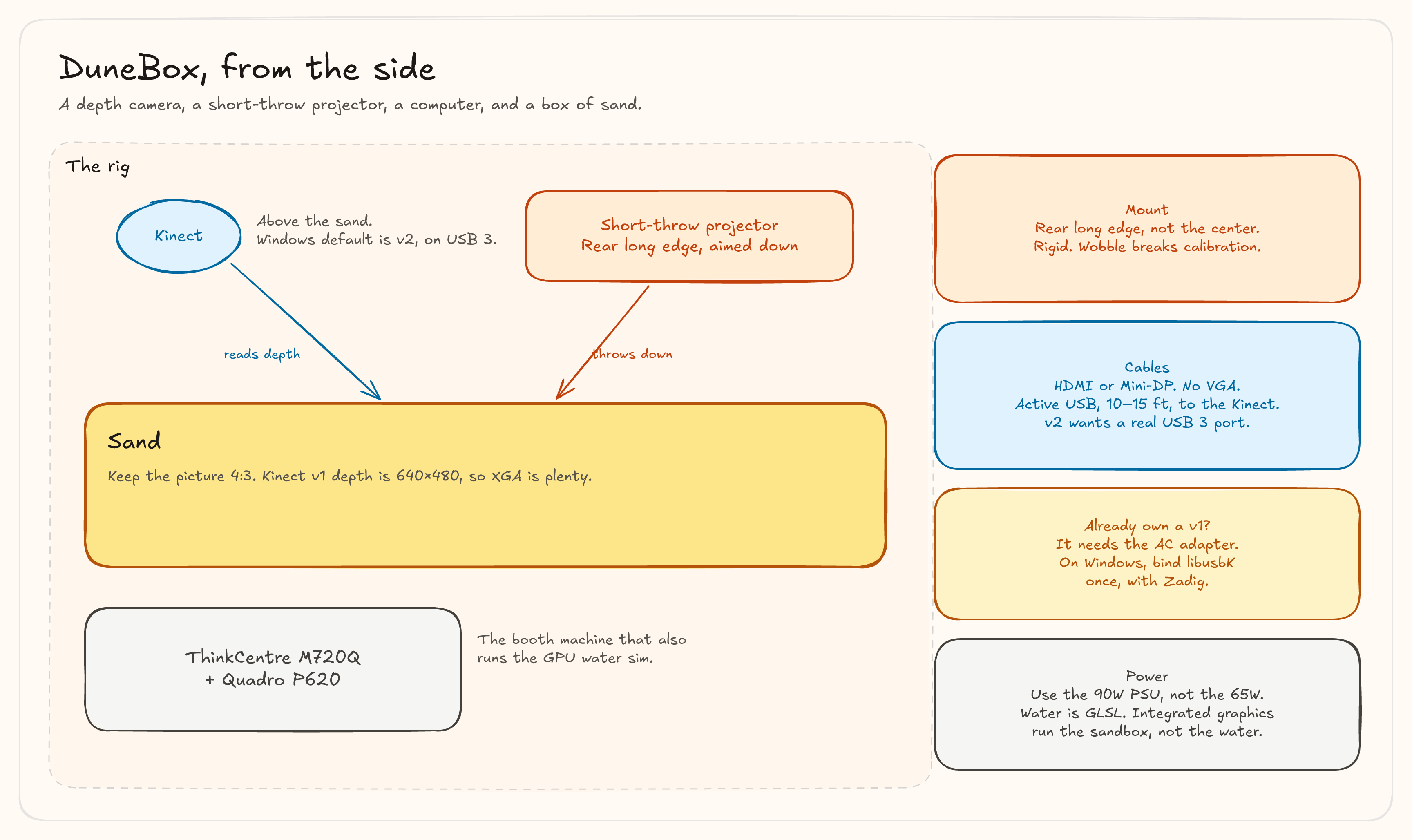
Kinect Depth Camera
| Model | DuneBox Support | sandcam Support | Notes |
|---|---|---|---|
| Kinect v1 (Xbox 360) | ✅ Native | ✅ Native | Models 1414 & 1473. Set <kinectVersion>1</kinectVersion> + Zadig/libusbK. |
| Kinect v2 (Xbox One) | ✅ Default (v0.2.0+) | ✅ kinect_v2_sdk |
Runtime 2.0, USB 3.0, Xbox One adapter ($30–80). Depth: 512×424. |
| Azure Kinect DK | ✅ Through sandcam | ✅ via pyk4a |
DuneBox uses kinectVersion=4 with sensor sharing on in sandcam. |
| Orbbec Femto Bolt / RealSense | ✅ Through sandcam | ✅ orbbec / realsense |
Same as Azure. Femto Bolt is the actively made Kinect replacement. |
Recommendation
Windows default is Kinect v2. Install Runtime 2.0, use a true USB 3.0 port, and press A in sandcam after mounting. Keep v1 if that is what you already have.
Kinect v1 Power
The Xbox 360 Kinect requires its AC power adapter for PC use. It does not run on USB bus power alone. The adapter splits into: - USB-A data cable → PC - DC barrel connector → wall outlet
Make sure you have this adapter. They're available on eBay/Amazon for ~$10.
Kinect v1 on Windows: driver required
Windows has no built-in driver for the Xbox 360 Kinect. Before DuneBox can see it, bind the libusbK driver to the three Kinect interfaces using Zadig (a one-time ~2-minute step). See the Troubleshooting guide for the exact steps.
Projector
| Spec | Recommendation | Why |
|---|---|---|
| Throw | Short-throw | Must project downward from above the sandbox |
| Resolution | XGA (1024×768) or higher | Kinect v1 depth is only 640×480: XGA is plenty |
| Aspect ratio | 4:3 | Matches Kinect field of view and sandbox shape |
| Connection | HDMI or DisplayPort | ⚠️ No VGA: analog causes pixel misalignment |
| Brightness | 2000+ ANSI lumens | Indoor use; brighter is better for ambient light |
| Reference model | BenQ MX631ST | ~$300–550, the UC Davis recommended model |
Projector Mounting
- Mount above the rear long edge of the sandbox, not the centre. Projectors throw the image above their centreline.
- Aim downward at the sand surface
- Must be rigidly mounted: any wobble ruins calibration
Computer
PC Compatibility Matrix
🥇 Lenovo ThinkCentre M720Q + Quadro P620 (RECOMMENDED)
| Spec | Detail |
|---|---|
| CPU | i5-8400T/8500T (6-core, 3.3–3.5 GHz boost) |
| GPU | Nvidia Quadro P620 (Pascal, 512 CUDA cores, 2GB GDDR5) |
| RAM | 8GB DDR4 |
| Ports | 6× USB-A, 1× USB-C, HDMI, DP, 4× Mini-DP (on P620) |
| DuneBox | ✅ 60 FPS |
| sandcam | ✅ 60 FPS |
| Water simulation | ✅ Solid ~20–35 FPS. P620 = ~30% of GTX 1060. |
Why #1: Only machine that can run ALL software including GPU water sim. Plenty of USB ports.
⚠️ PSU note: The stock 65W PSU is tight with the P620's 40W draw. Upgrade to the 90W PSU option Lenovo offers.
🥈 Lenovo ThinkCentre M720Q (Intel UHD 630 only)
Same as above but without the Quadro P620. Great for DuneBox and sandcam at 60 FPS. No water simulation (Intel IGP can't handle it).
🥉 Surface Laptop 2
Works for DuneBox/sandcam on Windows. Limitations: - Only 1× USB-A port (Kinect takes it: need Bluetooth peripherals) - No discrete GPU → no water simulation
🔴 Surface Pro 5th Gen
Least suitable. Dual-core CPU, thermal throttling, 1 USB-A port. OK for casual sandcam use only.
Minimum Specs (any PC)
| Spec | DuneBox (C++) | sandcam | Water simulation |
|---|---|---|---|
| CPU | x86 quad-core, 2GHz+ | Any modern CPU | x86, 3GHz+ |
| GPU | Integrated OK | None needed | OpenGL 3.2+ (4.3+ for compute); Nvidia recommended, AMD untested |
| RAM | 4GB | 4GB | 4GB |
| USB | 2.0 (Kinect v1) | 2.0 (Kinect v1) | 2.0 (Kinect v1) |
| Video out | HDMI/DP (no VGA) | HDMI/DP | HDMI/DP |
| OS | Windows 10/11 | Windows 10/11 | Windows 10/11 |
GPU Comparison
| GPU | Notes | Water Sim? |
|---|---|---|
| GTX 1060+ / similar | OpenGL 4.3 compute path | ✅ Target spec |
| Quadro P620 | Tested booth GPU | ✅ Solid ~20–35 FPS |
| Intel UHD 630 | GL 3.2 fragment path may run | ❌ Usually topology only |
Water is GLSL, not CUDA. AMD cards with GL 4.3 are not ruled out by the code; they are untested.
Note: DuneBox targets Windows only. All pre-built releases, CI builds, and setup scripts are Windows-based.
Cables & Adapters
| Cable | Why | Notes |
|---|---|---|
| HDMI 2.0, 10–15 ft | PC → projector | No VGA! |
| Active USB 2.0 extension, 10–15 ft | PC → Kinect at top of frame | Must be active (powered) for reliable data |
| Mini-DP → HDMI adapter | If using Quadro P620's Mini-DP output | ~$8 |
| Kinect AC adapter | Power for Kinect v1 on PC | Included with Kinect, or ~$10 on eBay |