Water simulation
Overview
DuneBox's water simulation uses GLSL shaders extracted from SARndbox (UC Davis) and adapted to run cross-platform via OpenFrameworks. The simulation solves the shallow-water equations (Saint-Venant) using Runge-Kutta 2nd order time integration on the GPU.
How It Works
The Physics
The shallow-water equations model water flow as a 2D grid where each cell tracks: - w: water surface height - hu: momentum in x-direction (height × velocity) - hv: momentum in y-direction (height × velocity)
These are stored in an RGB32F texture: (w, hu, hv).
Water flows from high terrain to low terrain. The flow speed depends on the height difference (gravity), and friction gradually slows the water down (attenuation).
The GPU Pipeline
Each frame, 8 shader passes run in sequence:
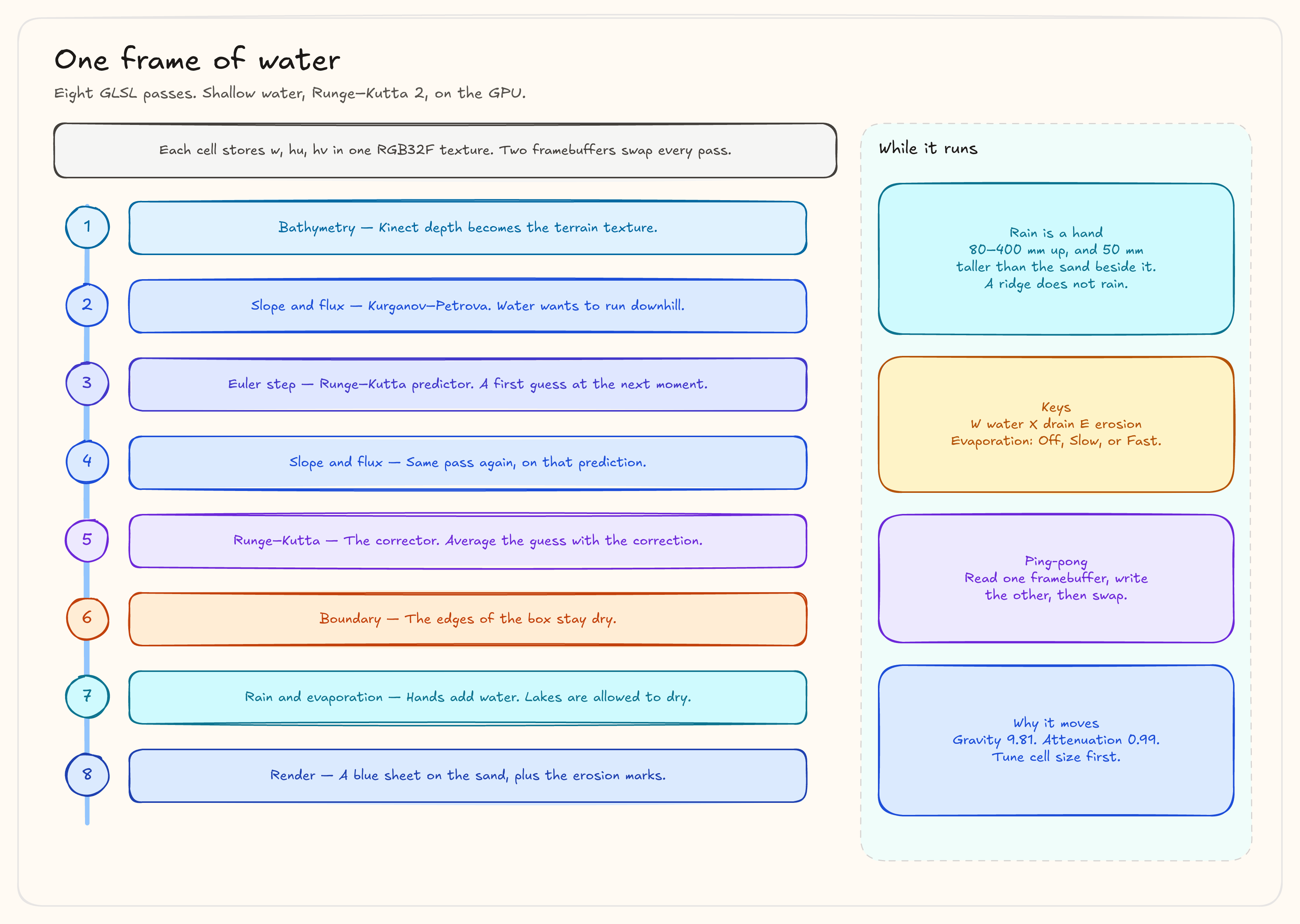
Kinect depth → [1. Bathymetry Update] → terrain texture
                        ↓
              [2. Slope + Flux + Derivative] → flow rates
                        ↓
              [3. Euler Step (RK2 predictor)] → predicted state
                        ↓
              [4. Slope + Flux + Derivative] → corrected flow rates
                        ↓
              [5. Runge-Kutta Step (corrector)] → final state
                        ↓
              [6. Boundary Enforcement] → dry edges
                        ↓
              [7. Water Add + Update] → rain + evaporation
                        ↓
              [8. Water Rendering] → blue overlay on terrain
Ping-Pong Buffering
The simulation uses two FBOs (framebuffer objects) that alternate each step: - Read from FBO A → write to FBO B - Next step: read from FBO B → write to FBO A
This avoids read-write conflicts on the GPU.
Shader Files
Located in bin/data/shaders/water/adapted/:
| Shader | Purpose |
|---|---|
BathymetryUpdate.frag |
Syncs terrain elevation with Kinect depth |
SlopeFluxDeriv.frag |
Computes water flow using Kurganov-Petrova scheme |
EulerStep.frag |
RK2 predictor: q* = q + dq·dt |
RungeKuttaStep.frag |
RK2 corrector: q_new = (q + q* + dq*·dt) / 2 |
Boundary.frag |
Enforces dry boundary at sandbox edges |
WaterAdd.frag/vert |
Adds water at rain gesture positions |
WaterUpdate.frag |
Applies evaporation/damping |
WaterRender.frag/vert |
Renders water as semi-transparent blue overlay, plus erosion marks |
Erosion.frag |
Carries sediment with the flow (erosion view) |
passthrough.vert |
Simple vertex passthrough for fullscreen quads |
Original (unmodified) SARndbox shaders are preserved in bin/data/shaders/water/ for reference.
Tuning Parameters
| Parameter | Default | Range | Effect |
|---|---|---|---|
gravity |
9.81 | 1.0–20.0 | Higher = water flows faster |
attenuation |
0.99 | 0.9–1.0 | Lower = more friction (water stops sooner) |
theta |
1.5 | 1.0–2.0 | Minmod limiter: 1.0 = smoother, 2.0 = sharper waves |
epsilon |
0.01 | 0.001–0.1 | Prevents division-by-zero in dry cells |
cellSize |
1.0 | 0.1–10.0 | Physical scale factor: tune to match Kinect depth units |
Tips
- Start with defaults and adjust
cellSizefirst: this has the biggest impact on whether water flows realistically - If water moves too fast, reduce
gravityor increaseattenuation - If water looks "blocky", reduce
thetatoward 1.0 - If shallow water behaves erratically, increase
epsilon
Rain Gesture
The rain gesture detects hands above the sand surface:
- The system scans Kinect depth data for pixels significantly above the baseline sand level
- Only a band 80–400 mm that is also ≥50 mm taller than nearby sand is treated as a hand (a ridge no longer rains)
- Water is added at the hand's XY position with a configurable radius and rate
- Remove your hand → rain stops, water flows away naturally
Rain from hands can be switched off in the dashboard (DuneBox → Rain from hands), for example when visitors keep leaning over the box.
Water Controls
From the sandcam dashboard's DuneBox group, or the keyboard in DuneBox:
| Control | Key | What it does |
|---|---|---|
| Water simulation | w |
Turns the simulation on or off |
| Evaporation | dashboard | Off, Slow or Fast. Lakes slowly dry up so a long session doesn't flood the box |
| Drain all water | x |
Removes all water at once |
| Show erosion | e |
The erosion and sediment view below |
Erosion and Sedimentation
With Show erosion on, flowing water picks up sediment, carries it downstream and drops it where it slows:
- Fast, deep water carries more. Where it can carry more than it holds, it scours the bed.
- Where the flow slows, at a slope break, a lake or the edge of a puddle, it drops sediment.
- When water dries up, everything it carried is left behind.
What you see:
| On the sand | Meaning |
|---|---|
| Muddy brown water | Water carrying sediment |
| Dark brown scars | Where water carved the bed (visible once the water drains) |
| Pale sand patches | Deltas and deposits where the flow slowed |
The real sand can't move on its own, so this is a drawn layer, not a change to the terrain the water flows over. Marks fade over about 20 seconds, and reshaping the sand by hand clears them where you dig. It is off for lava.
The shared tuning lives in src/WaterSimulation/ErosionParams.h (capacity, erode and deposit rates, fade). The shaders are Erosion.frag (fragment path) and erosion.glsl (compute path); both give identical results.
Performance
| GPU | Expected FPS | Notes |
|---|---|---|
| GTX 1060+ | 30–60 FPS | Full speed, smooth water |
| Quadro P620 | 20–35 FPS | Solid for most water scenarios |
| Intel UHD 630 | not supported | Water sim disabled (topology only) |
The water simulation is the most GPU-intensive part of DuneBox. If FPS drops below 15, consider: - Running fewer simulation steps per frame - Reducing the simulation grid resolution - Disabling water and using topology-only mode
Compute Shader Backend (GL 4.3+)
On GPUs that support OpenGL 4.3 or later, DuneBox automatically uses compute shaders instead of the fragment shader pipeline. This is detected at startup: if GL 4.3 is unavailable, the original 8-pass fragment shader pipeline is used as a fallback.
Why Compute Shaders?
Compute shaders replace the 8 fragment passes with 5 compute dispatches:
| Fragment Pipeline (GL 3.2) | Compute Pipeline (GL 4.3+) |
|---|---|
| 8 FBO ping-pong passes | 5 compute dispatches |
| Bathymetry + slope/flux + RK2 + boundary + add + render | bathymetry_update.glsl → water_step.glsl (predictor + corrector) → boundary.glsl → water_add.glsl + water_render.glsl |
The key optimization is shared memory: slope calculation, flux computation, and derivative estimation are merged into a single dispatch because neighboring workgroup threads can share intermediate results via shared memory instead of writing to a texture and reading it back.
Workgroup Layout
All compute shaders use 16×16 workgroups:
This maps well to typical GPU warp/wavefront sizes (256 threads per workgroup).
In-Place Updates
Compute shaders use imageLoad() / imageStore() for direct read-write access to textures, eliminating the need for ping-pong FBOs in most passes. Barrier synchronization (memoryBarrierImage()) ensures correct ordering.
Compute Shader Files
Located in bin/data/shaders/water/compute/:
| Shader | Purpose |
|---|---|
bathymetry_update.glsl |
Syncs terrain with Kinect depth |
water_step.glsl |
RK2 predictor (mode=0) and corrector (mode=1) |
boundary.glsl |
Edge conditions |
water_add.glsl |
Rain / evaporation |
water_render.glsl |
Color overlay, plus erosion marks |
erosion.glsl |
Carries sediment with the flow (erosion view) |
Lava Simulation
DuneBox supports a lava mode that reuses the same shallow-water physics engine with different parameters to simulate viscous lava flow.
Parameter Differences
| Parameter | Water | Lava |
|---|---|---|
| Attenuation | 0.99 (low friction) | 0.85 (viscous, slows quickly) |
| Opacity | 5.0 | 8.0 (denser, more opaque) |
| Color | Blue, depth-based transparency | Orange-yellow (shallow) → deep red → black crust (cooling) |
Controls
lkey: toggles lava mode on/off- Activating lava mode automatically switches the color theme to Volcanic
Lava is a parameter set on the same fluid (FLUID_WATER vs FLUID_LAVA), not a second simultaneous layer. There are no steam particles in the C++ app.
Configuration: waterSettings.xml
Water simulation parameters are stored in an XML settings file that persists across sessions.
File Location
Parameters
| XML Element | Type | Description |
|---|---|---|
gravity |
float | Gravitational acceleration (default: 9.81) |
attenuation |
float | Friction/damping factor (default: 0.99) |
theta |
float | Minmod limiter parameter (default: 1.5) |
epsilon |
float | Dry-cell threshold (default: 0.01) |
cellSize |
float | Physical scale factor (default: 1.0) |
waterOpacity |
float | Rendering opacity (default: 5.0) |
fixedDt |
float | Fixed timestep for simulation stability |
maxStepsPerFrame |
int | Cap on simulation steps per render frame |
enabled |
bool | Whether water simulation is active |
lavaMode |
bool | Whether lava mode is active |
Behavior
- Loaded at startup: the app reads this file on launch and applies all values
- Saved on exit: any changes made during a session (via UI or keyboard) are written back
- Manual editing: you can edit this file with a text editor to fine-tune parameters without recompiling; changes take effect on next launch
Technical Details
For the full shader analysis (uniforms, textures, pipeline), see:
- bin/data/shaders/water/SHADER_ANALYSIS.md (in the DuneBox repo)
- docs/RENDER_PIPELINE_ANALYSIS.md (in the DuneBox repo)